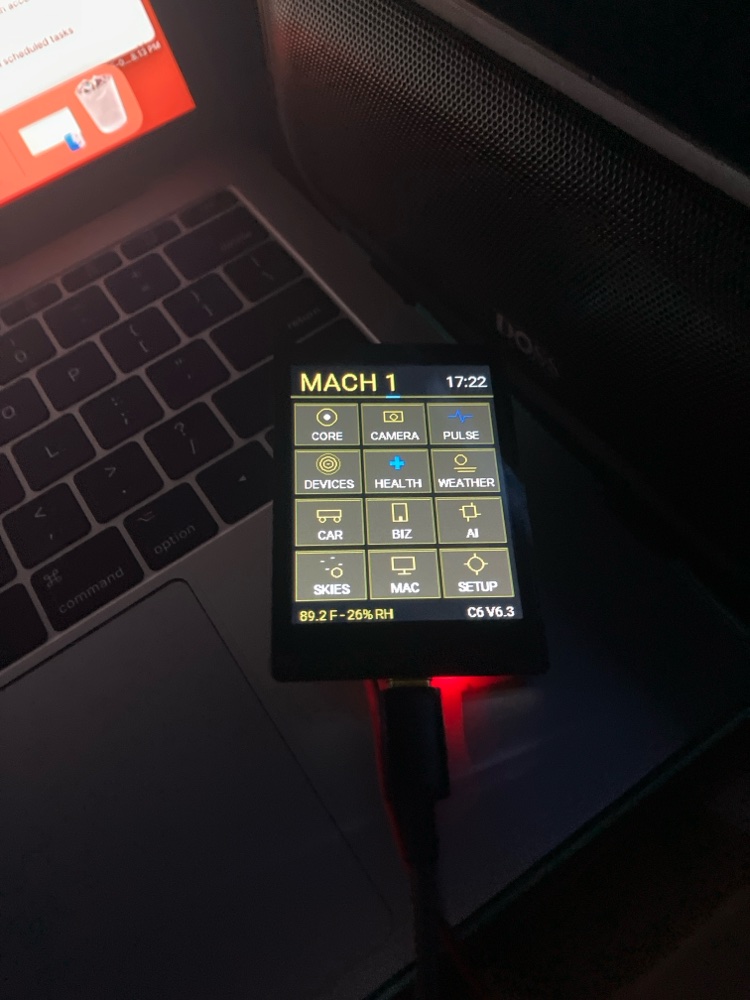
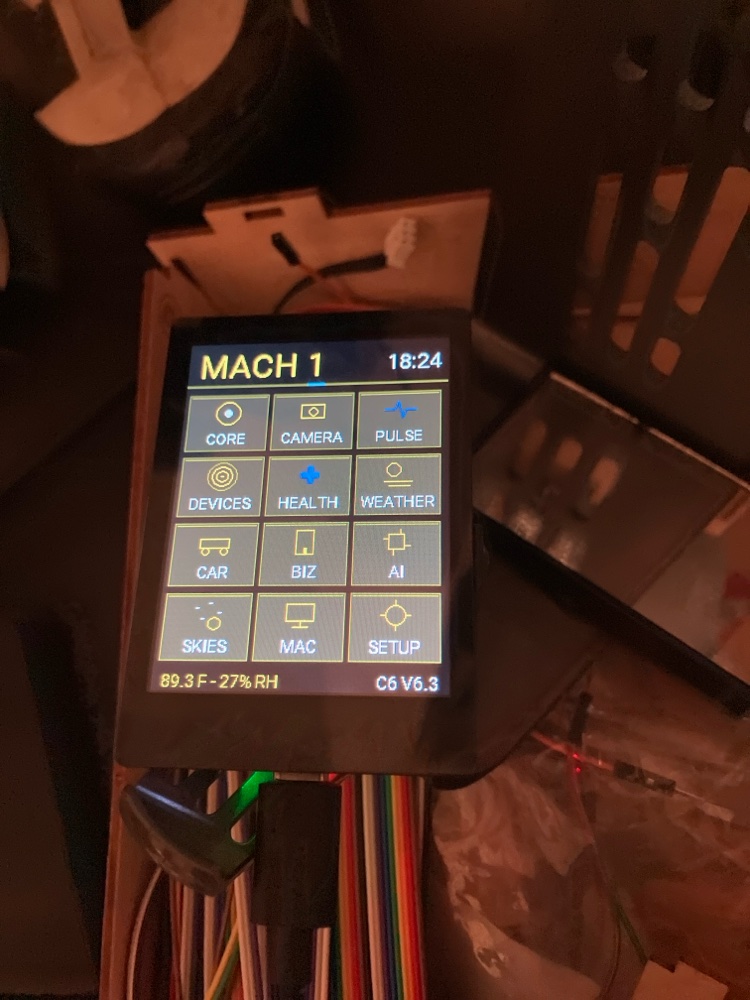
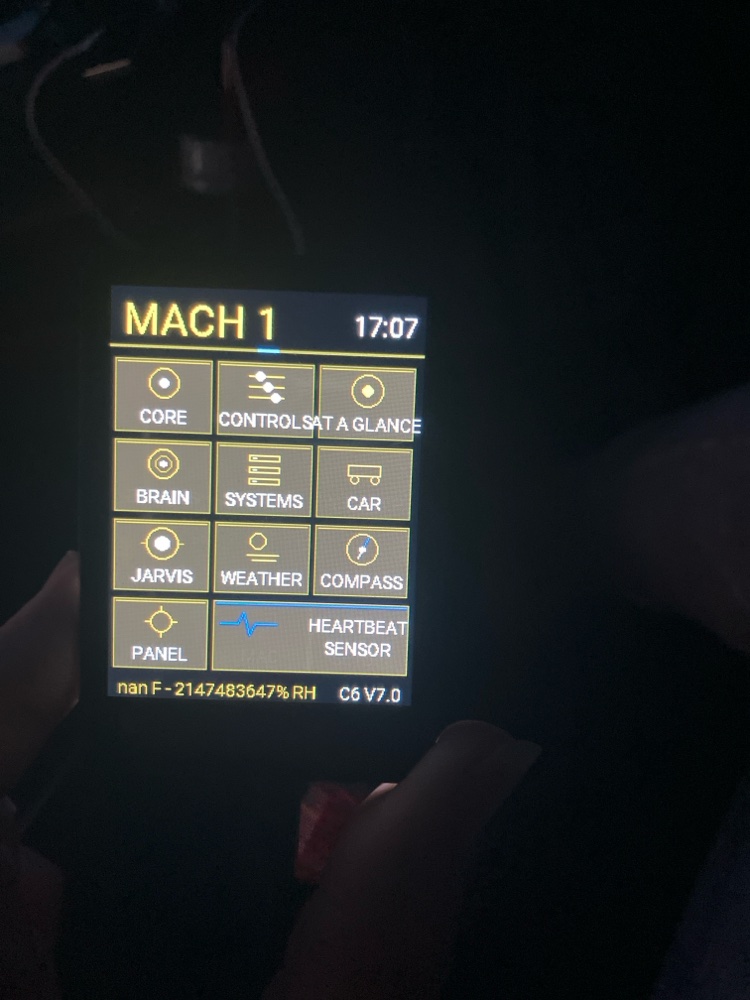
Real unit photo — the bench unit on the desk, beside the Mac it controls, 2026-11-14. This is the 2.8″ LCD build (the Premium’s hardware) — the unit on our bench today, running the current firmware. The Flagship’s AMOLED unit is photographed the day its first article exists; until then we show the real thing we have, not a render.
Parts ordered only after payment clears. Every build is QA-photographed before it ships. The Flagship is a founding run — your timeline is confirmed in writing before payment.
What it is
A tablet is a general computer. This is an appliance. Each face does one job and does it cleanly. The unit is yours; there is no account required to use what you bought.
Two builds today. The Flagship ($149) moves the panel to a 2.16″ AMOLED (480×480) — that port is in the queue, and its engineering publishes when its first unit exists. The Premium ($99) is the 2.8″ LCD build: the hardware on our bench, photographed on this page, running the firmware the engineering section below documents. Same faces, same ownership terms, either way.
Current faces
What is on the glass in the current build (055) — and what each face does not do.
Lock + home clock
The panel boots to a lock screen; the home face is the clock with the panel’s own readings — room temperature and humidity from its onboard sensor, battery, Wi-Fi — all read on the device. Does not: unlock reliably yet — build 055 added slide-to-unlock and it failed its bench test, 0 of 20 slides (see the build log below). The failure is under diagnosis and no fix has been flashed, so treat the lock as a screen lock, not a security feature.
The launcher — Deep Water
One page, every face a tile: Core, Controls, At a Glance, Brain, Systems, Car, Jarvis, Weather, Compass, Panel, Heartbeat Sensor. One job per tile, one tap to it. Does not: run third-party apps — the face set is the product.
Weather
Current conditions and the week ahead for the place set at setup, fetched over your own Wi-Fi. Does not: track your location — the place is the one set at setup, and nothing about it leaves your network.
Stocks ticker
The symbols picked at setup, served by a small market-data service on your own network: a live number with its fetch time — or an honest blank when the upstream feed rate-limits, instead of an invented number. Does not: give financial advice. It shows information, plainly labelled with when it was fetched.
Heartbeat Sensor
Bluetooth presence: which of your nearby devices are in the room, from their Bluetooth advertisements — read live on the bench with around twenty contacts in range. Does not: measure a pulse or a heart rate. It is radio presence, never a medical sensor.
Mac Controls
Media, volume, brightness, app launch, lock, sleep and focus for the Mac on your desk, sent over your own network. Does not: work over the internet — it talks to your Mac on your local network, and to nothing else.
Systems & devices
The house system and its devices at a glance — status, on the glass. Does not: sense your air. This panel has no air-quality sensor; status faces display the house system’s data, and the panel’s own sensors are temperature, humidity, motion and Bluetooth presence.
QT companion
A companion face in text. Does not: speak — QT ships in text/silent mode; voice is not part of this build.
See the home face working — the working demo runs the panel’s home screen on your real day, with live weather and a live market tile, in your browser.
Engineering
How the Panel is built — the real numbers, where each one comes from, and the ones that do not exist yet.
Hardware — the unit on the bench
Board
Waveshare ESP32-C6-Touch-LCD-2.8 (SKU 35065) — read back from the bench unit itself, not taken from a listing.
Chip
ESP32-C6 — 16 MB flash, read back from the unit. Wi-Fi 6 and Bluetooth 5 on the chip.
Display
2.8″ IPS LCD, 240 × 320, ST7789 driver — Waveshare’s specification for this board.
Touch
Capacitive, CST3530 controller (Waveshare specification). In our firmware: tap only for navigation — no swipe or gesture recognition. The one exception is the lock screen’s slide-to-unlock, added in build 055 — which failed its bench test (0 of 20; see the build log).
Sensors
Temperature and humidity on the board — the readings on the home face are the panel’s own, read back live at the bench (31.6–34.2 °C across a warm-up, 26–29% RH). A 6-axis motion sensor (QMI8658, Waveshare specification) — this board has no magnetometer, and we say so because a compass face depends on it.
Battery & power
3.7 V lithium cell, 1,000 mAh by the manufacturer’s statement (we have not house-measured the capacity), on an MX1.25 header with onboard charge management; USB-C for power and top-up. At the last bench check the unit read back 94% at 4.12 V. The percentage is a voltage-derived estimate, ±10% — there is no charge-state signal in the firmware, so we show no charging claim.
Firmware
Build 055 — our own firmware on ESPHome / ESP-IDF, flashed by USB on 2026-11-19 and saved whole in our code library. Core faces run on the device; no cloud dependency, no vendor account in the loop.
Enclosure
Not yet — stated plainly. The final housing (an anodised aluminium band frame with a fitted glass back) is a costed programme specification; the proof housings are not built yet, and the bench unit is the board on a stand. The enclosure publishes the day a unit exists in it.
Why we chose this
The ESP32-C6 — Wi-Fi 6, Bluetooth 5 and 802.15.4 headroom in a low-power part: one radio for today, room for tomorrow, and nothing that needs a vendor cloud to work.
The 2.8″ glass — glanceable at desk distance. A focused face needs exactly the pixels its job needs, and no more.
ESPHome on ESP-IDF — open, auditable firmware. You can read what your appliance runs; no account server sits between you and it.
A cell plus USB-C — untethered when you want it, topped up from the same cable as everything else on the desk.
Not yet measured
Power draw, battery runtime, charge time, screen brightness, boot time, and finished dimensions and weight do not exist yet — because we have not measured them. The drain test has never been run on this firmware line. When the bench measures a number, it lands on this page, dated, with the test named. Until then, this section is the honest spec: what is missing, and why.
Dated build log
2026-11-14 — Deep Water build: over-the-air updating proven end-to-end on this firmware line — the new firmware was read back from the update slot after the push. The memory diet that made the build fit cut no features.
2026-11-15 — An over-the-air push failed to connect (three attempts); the cause was never isolated. Recorded as an open fault, not buried.
2026-11-17 — Build 054 (firmware v7.5) flashed: the crash loop that had bricked the panel is dead — it boots clean with every feed live. The build is saved whole in the code library.
2026-11-18 — Bench audit of build 054: it fails the 30-minute soak — under sustained load the panel reboots; memory fragments as the feeds load (free heap fell from 76,812 B after boot to 54,320 B with feeds up). The fix — a memory diet on the feed path — is specced as build 055. The panel was backed up whole and stays on 054, defects on record, until 055 passes the soak.
2026-11-19 — Build 055 flashed by USB. It carries the attempted fixes: slide-to-unlock with an end-position rule, a wake-touch fix, and the memory diet on the feed path. The boot test passed. Then the unlock test failed: 20 slides by hand — 10 fast, 10 slow — and 0 unlocked. The soak re-run was stopped on the owner’s order before it could return a verdict, so no soak result exists for 055. The serial log was pulled to find the cause, but the capture began after the test window closed, so it holds no touch events from the test at all: the diagnosis is inconclusive and the root cause is not yet known. No fix has been flashed. The panel runs 055 with the unlock defect on record; the re-test runs with the capture started before the slides. Over-the-air updating on this build has never been attempted — its status is unknown, and this log will say so until a proof run replaces “unknown” with a verdict.
Ownership
No account required
Core faces run locally
Updates (if any) are optional and documented
You can open it; we document the major parts
What that means in practice: every face state and sensor reading stays on the panel and your own network unless you wire an integration yourself. There is no activation server to shut off, no subscription to lapse, no kill switch. Firmware updates are documented builds you apply yourself — nothing is ever pushed to your panel silently. Over-the-air updating was proven on this firmware line on 2026-11-14; certification on the current build is pending, and the build log above says exactly where that stands.
Proof
The actual unit, photographed at the bench — including the faults, because the record is the record.
Parts ordered only after payment clears. Lead time is 2–3 weeks — that is the standing standard, stated plainly: no external unit has shipped yet, so no measured average exists, and we will publish the real one when it does. Every build is photographed before it ships, and the buyer gets the photograph of their unit. The full record — QA standard, response standard, and the rest of the proof — lives on the proof page.
Guarantee
110% store credit within 30 days — the 10% bonus capped at $10 per order, reviewed by a person, written response. The full terms are the Toolbox Promise.